At first, I just wanted to make a lighter-weight screen.
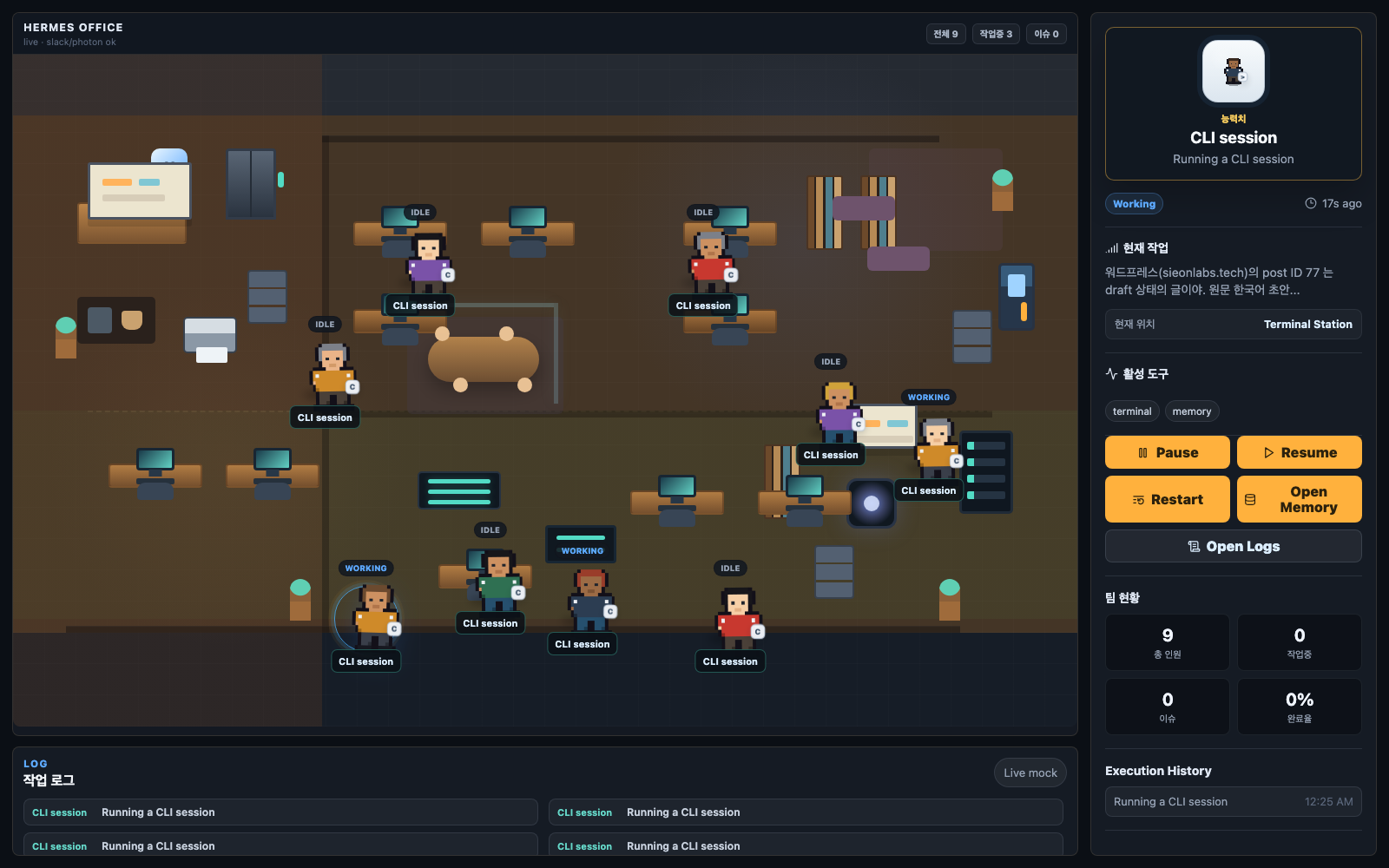
Every time I wanted to see what an AI agent was doing, looking at logs or table-style dashboards felt a little dry. The numbers and status fields were accurate, but they did not make it easy to feel, at a glance, whether the office was busy right now.
So I built a small side project called Agent Office. It is a pixel-art office view built with Vite, React, and TypeScript. Instead of showing agent activity as rows in a table, it represents it as avatars sitting at desks.
The first mockup was pretty simple. There were eight named agents, each sitting at their own desk. One was coding, another was writing, another was watching cron jobs, and so on. It had a small world of its own, and it looked good. The problem appeared when I connected it to the real system.
The real system did not have the “roster of multiple agents” I had imagined.
There was one profile, and the real unit of activity was the session. Each session had a source depending on whether the user came in through the CLI, Slack, a cron job, Telegram, or iMessage. Each session also carried fields such as whether it was active, when it last did anything, its title, and a preview.
So the thing I needed to draw on screen was not “eight fixed agents.” It was the set of sessions that were alive now or had been active recently.
That is when I flipped the screen design. I threw away the fixed roster and changed the app so that each active or recent session spawns one avatar. Then I divided desk areas by source. A session from the CLI goes to the CLI area. A session from Slack goes to the Slack area.
What made this interesting was that it was not just a UI fix. The mockup had invented a worldview, the real data contradicted it, and the screen eventually had to follow the worldview of the data.
Authentication followed the same pattern. The production server used cookie-based sessions, and even during development I did not want to pass credentials directly to the browser. So I made the development server middleware proxy the API requests. Cookies and credentials stay on the server side, and the browser only receives the data it needs. Local credentials live only in an environment file that is excluded from version control.
It is a small side project, but it captures a lesson I keep learning over and over.
A good observability screen is not about decorating a system into the shape I imagined. It is closer to discovering the units the system actually moves through, then putting those units at the center of the interface.
That is why the Agent Office sometimes looks empty. At first, that felt like a bug. If no avatars appeared, it seemed like something was wired up incorrectly.
Most of the time, though, it was not a bug.
It simply meant nobody was using an agent at that moment. An empty office is a state too. Once the screen could show that naturally, this small pixel-art view started to feel a little more like a real observability tool.
한국어 버전
픽셀아트 사무실로 내 AI 에이전트 들여다보기
처음에는 그냥 가벼운 화면을 만들고 싶었다.
AI 에이전트가 지금 무엇을 하고 있는지 확인하려고 매번 로그나 표 형태의 대시보드를 보는 일이 조금 건조하게 느껴졌다. 숫자와 상태값은 정확하지만, 한눈에 “지금 사무실이 바쁜가?”를 느끼기에는 부족했다.
그래서 Agent Office라는 작은 사이드 프로젝트를 만들었다. Vite, React, TypeScript로 만든 픽셀아트 사무실 화면이다. 에이전트 활동을 표가 아니라 책상에 앉은 아바타로 보여주는 식이다.
처음 목업은 꽤 단순했다. 이름이 붙은 에이전트 8명이 있고, 각자 자기 책상에 앉아 있었다. 누군가는 코딩을 하고, 누군가는 글을 쓰고, 누군가는 크론 작업을 보는 식의 작은 세계관이었다. 보기에는 좋았다. 문제는 실제 시스템과 연결하면서 드러났다.
실제 시스템에는 내가 상상한 “여러 명의 에이전트 로스터”가 없었다.
프로필은 하나였고, 진짜 활동 단위는 세션이었다. 사용자가 CLI에서 말을 걸었는지, Slack에서 들어왔는지, 크론 작업으로 실행됐는지, Telegram이나 iMessage에서 시작됐는지에 따라 source가 붙었다. 각 세션에는 활성 여부, 마지막 활동 시간, 제목, 미리보기 같은 필드가 있었다.
그러니까 내가 화면에 그려야 할 것은 “고정된 8명의 에이전트”가 아니었다. 지금 살아 있거나 최근에 활동한 세션들이었다.
그때 화면 설계를 뒤집었다. 고정 로스터를 버리고, 활성 또는 최근 세션 하나당 아바타 하나를 스폰하도록 바꿨다. 그리고 source별로 책상 구역을 나눴다. CLI에서 온 세션은 CLI 자리로, Slack에서 온 세션은 Slack 자리로 가는 식이다.
이 과정이 재미있었던 이유는 단순히 UI를 고친 일이 아니었기 때문이다. 목업이 만든 세계관을 실제 데이터가 반박했고, 결국 화면은 데이터의 세계관을 따라가야 했다.
인증 처리도 비슷했다. 실서버는 쿠키 세션 방식이었고, 개발 중이라고 해서 자격증명을 브라우저에 직접 넘기고 싶지는 않았다. 그래서 개발 서버 미들웨어가 API 요청을 대신 중계하도록 했다. 쿠키와 자격증명은 서버 쪽에서만 다루고, 브라우저는 필요한 데이터만 받는다. 로컬 자격증명은 버전 관리에서 제외된 환경 파일에만 둔다.
이건 작은 사이드 프로젝트지만, 내가 자주 반복해서 배우는 교훈이 들어 있었다.
좋은 관측 화면은 시스템을 내가 상상한 모양으로 꾸미는 일이 아니다. 시스템이 실제로 어떤 단위로 움직이는지 찾아내고, 그 단위를 화면의 중심에 놓는 일에 가깝다.
그래서 Agent Office에서 사무실이 텅 비어 보일 때가 있다. 처음에는 그게 버그처럼 보였다. 아바타가 안 뜨면 뭔가 잘못 연결된 것 같았다.
그런데 대부분은 버그가 아니었다.
그냥 지금 아무도 에이전트를 쓰고 있지 않다는 뜻이었다. 빈 사무실도 하나의 상태다. 오히려 그걸 자연스럽게 보여줄 수 있게 된 순간, 이 작은 픽셀아트 화면이 실제 관측 도구에 조금 가까워졌다고 느꼈다.